
How to Translate a Self-Published Book with Bookshift
If you've been looking for a way to translate your self-published book without ending up with stiff, overly-literal output that reads like it was translated word by word with a dictionary, you're in the right place. Bookshift isn't a single-pass machine translation tool, instead its sophisticated process produces fluent, publication-ready prose, and the entire submission process takes under a minute.
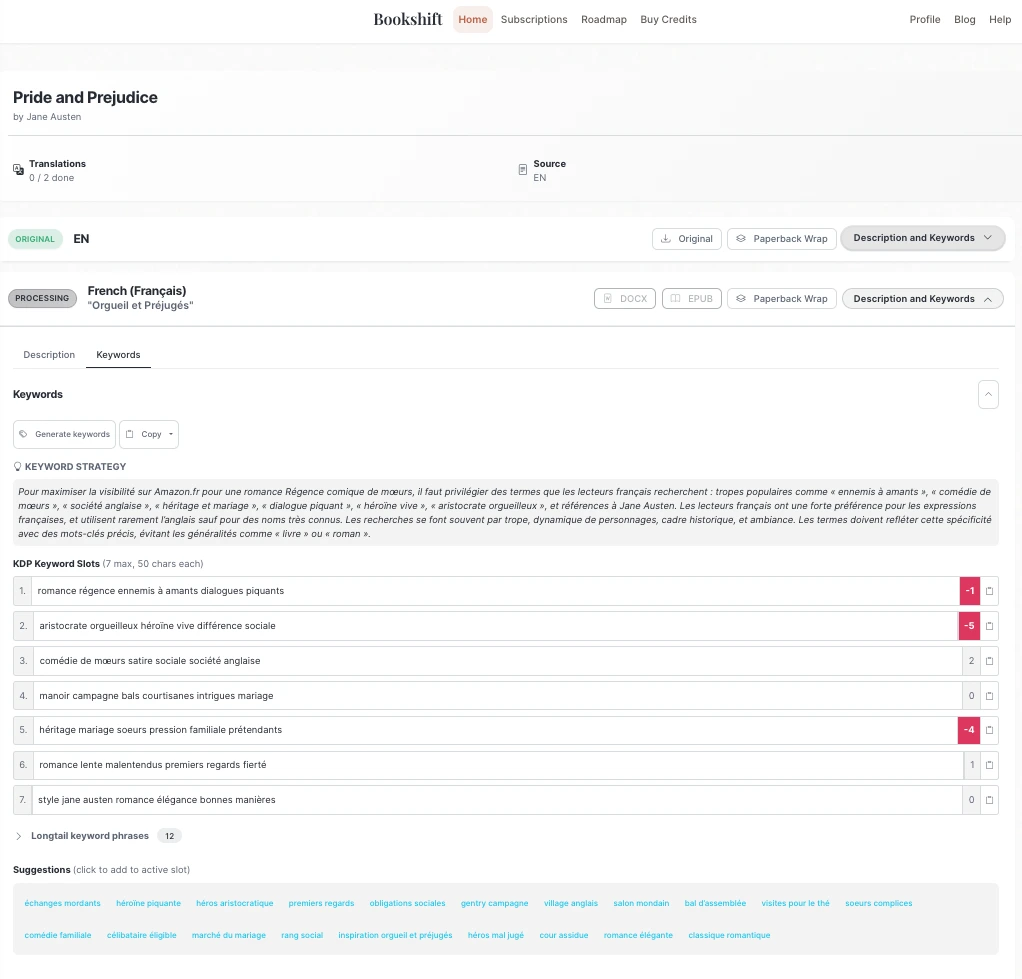
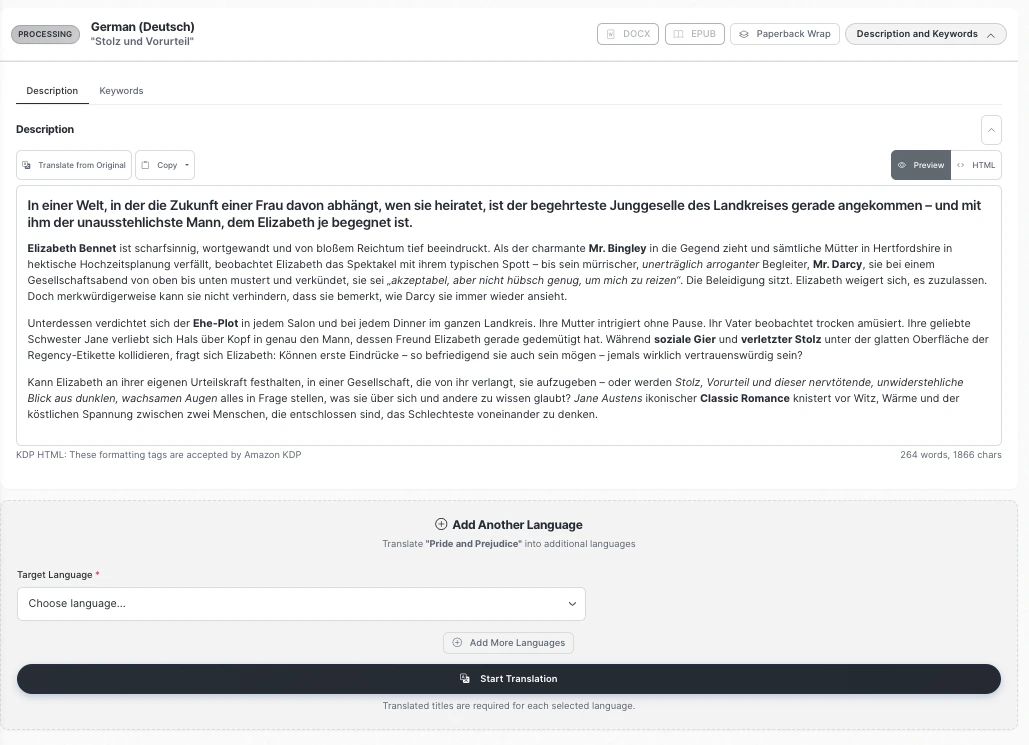
In 10-20 minutes, you receive a translated EPUB or editable DOCX, plus a complete marketing pack: a localized blurb (including a KDP HTML version), seven sets of KDP keywords, additional keyword variations, and alternative title options. Everything is also available to download from your translation dashboard at any time, where you can also add more languages or start designing a PDF paperback wrap.
This is the canonical Bookshift workflow guide. For a shorter service overview, start with the public book translation landing page. For click-by-click product help, use Translate a Book: Step-by-Step.
Quick Answer
TL;DR — Three steps to a translated book:
- Upload your manuscript (DOCX, EPUB, TXT) on Bookshift submission page.
- Select your target language(s) from 25+ options and confirm or customize your translated title.
- Submit — then check your email (or dashboard) for your finished EPUB/DOCX and marketing pack.
After translation, run a quality pass with AI manuscript proofreading, then create print files with the paperback wrap generator if you plan to publish through KDP Print or IngramSpark.
What You Need Before Starting
Before you hit the submit page, run through this short checklist. Skipping any of these is the most common source of avoidable delays.
Accepted File Formats
Bookshift accepts DOCX, EPUB, TXT, and HTML manuscripts. An EPUB is the most reliable format for preserving the chapter structure and formatting.
Common mistake: Submitting a PDF. PDFs are not currently accepted—text extraction from PDFs is lossy and produces formatting artifacts that degrade translation quality.
Manuscript Preparation Tips for DOCX Submissions
- Remove headers and footers from your DOCX before uploading. Running headers (e.g., author name, book title) will be translated as body text if left in.
- Check your chapter headers. Bookshift works best if you use your wordprocessor's "Heading 1" or "Heading 2" formatting for chapter titles. But don't worry if you forget, Bookshift will figure it out!
- Explicit content is supported. Bookshift handles all genres. You don't need to sanitize your manuscript.
Step-by-Step Guide
Step 1: Upload Your Manuscript
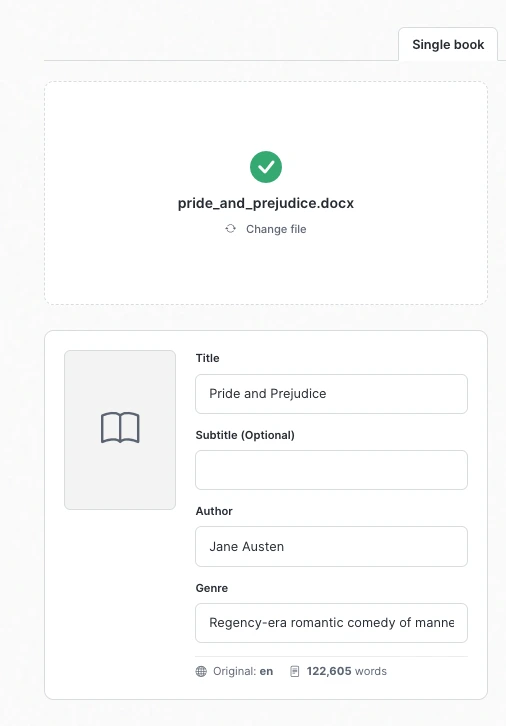
Navigate to the submit your manuscript page. You'll see a file upload area at the top of the submission form.
Drag and drop your file, or click to browse. Accepted formats are displayed on the page. Once your file uploads, Bookshift will display your detected word count. This determines how many credits are used.
Step 2: Select Your Target Language(s)
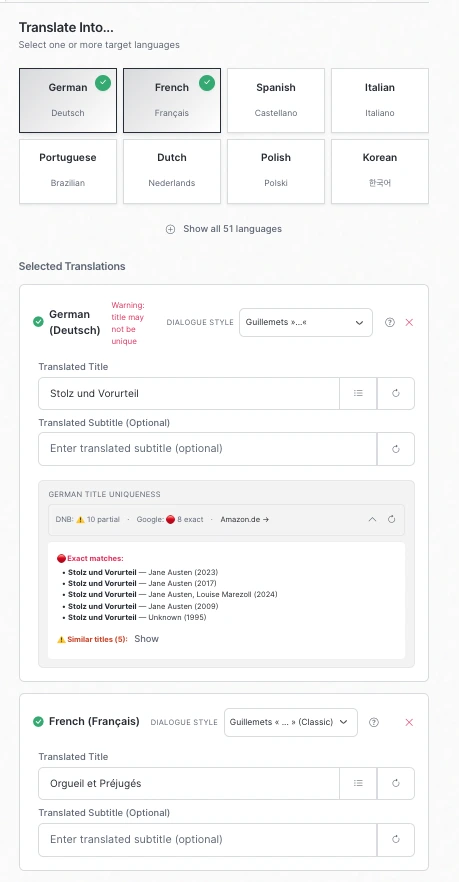
After uploading, you'll be prompted to choose one or more target languages from Bookshift's list of 25+ supported languages. You can select multiple languages in a single submission—each generates a separate translated output, complete with its own set of keywords and book description.
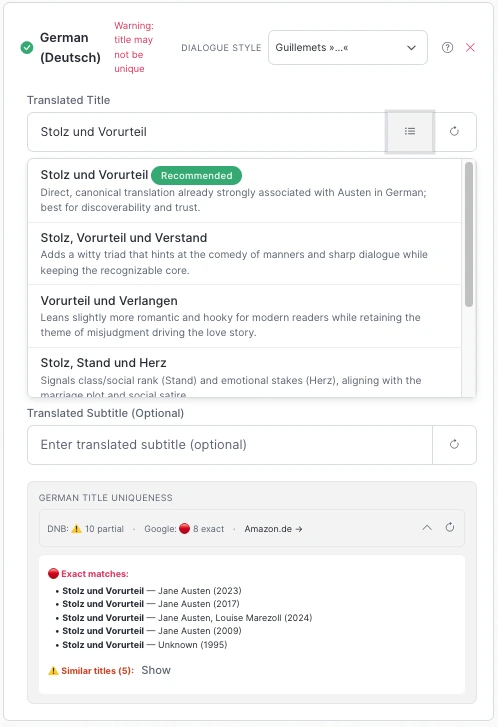
For each language you select, Bookshift will present you with one or more Intelligently generated title translation suggestions, each accompanied by a plain-language explanation of the translation choice—written in your language, so you understand exactly what connotation or tone each option carries.
You have three options here:
- Accept a suggested title as-is.
- Choose a different suggestion from the alternatives provided.
- Enter your own translated title manually, if you already have a preferred version.
Why this matters: Your title is the first thing a reader in that market sees. A title that translates literally may be grammatically correct but tonally flat, or, in some markets, unintentionally comic. The explanation panel is there specifically to help you make an informed choice without needing to speak the language yourself.
Special German Title Consideration: German markets require you to follow the "Titelschutz" rules. In short, that means titles should be unique. For more detail, see our full article on Titelschutz written by our German editing associate, Anastasia. The good news is, Bookshift checks the German National Library as well as Google Books and warns you if your translated title isn't unique. To be certain, we also provide a direct link to search amazon.de with your chosen title.
Step 3: Review and Submit
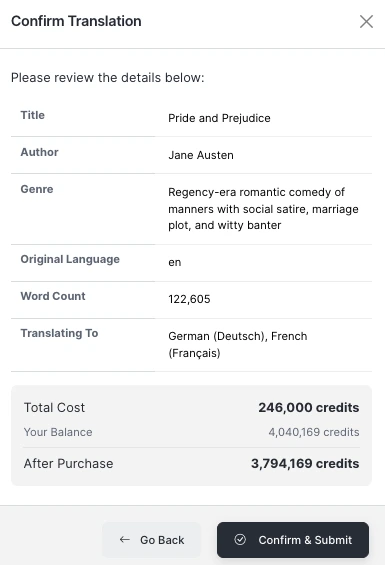
Before submitting, you'll see a summary screen showing:
- Your manuscript file name and word count
- Each selected target language and your chosen translated title
- Credits that will be used
Review this carefully. Once you confirm and submit, the translation job enters the pipeline immediately.
What happens after you hit Submit: Bookshift runs your manuscript through a multi-stage pipeline—preprocessing, continuity and translation guide generation, a first translation pass, several rounds of iterative refinement, and a final naturalization pass that smooths out any phrasing that reads as translated rather than written. This is the core difference from other translation services that just use a single-pass translation: by the time the output reaches you, it's been through multiple editing and proofreading stages, not just one shot at getting it right.
Step 4: Receive Your Translated Files
When your translation is complete, you'll receive an email notification with your files attached. You can also access everything from your translation dashboard at any time—no need to hunt through your inbox.
For each target language, your delivery includes:
The translated manuscript:
- A publication-ready EPUB formatted for retail platforms
- An editable DOCX for any post-translation editing or proofreading passes, or to import into your formatting software.
The marketing pack:
- A localized blurb written in the target language
- A KDP HTML blurb version — formatted with the bold/italic tags KDP's description editor accepts, ready to paste directly into your KDP dashboard without reformatting
- 7 sets of KDP keywords using the terms that readers actually search for
- Additional keyword variations beyond the core seven sets are additional longtail keywords
- Alternative title options if you want to reconsider your title choice
KDP Assistance: The KDP HTML blurb is a detail that saves real time. KDP's description field uses a limited subset of HTML tags (<b>, <i>, <br>, <p>, <h4> etc.), and formatting a blurb manually—especially in a language you don't read—is error-prone. The pre-formatted version eliminates that friction entirely. Click the "source" button on the KDP subscription box to paste in the html, and then click it again to see how it will render on your product page
Step 5: Optional — Translate or Generate Your Cover
While your manuscript translation is processing, you have the option to work on your cover. Bookshift offers two cover services that integrate naturally into this workflow:
Cover Translation: Upload your existing cover file and Bookshift will translate the text elements (title, subtitle, author name, series name, tagline) while preserving your original design. Output is sized for ebooks.
Cover Generation: If you don't have a cover yet for the translated edition—or want a market-specific variant—Bookshift can create a beautiful cover for you in seconds. You can use it for a refresh on your original book, too!

After You Receive Your Files: Recommended Next Steps
Prepare Your KDP Metadata
With your marketing pack in hand, you have everything you need to set up your KDP listing in the target language:
- Use the KDP HTML blurb in the description field.
- Enter your translated title and subtitle.
- Use the KDP keyword sets across your seven keyword slots.
Common Troubleshooting
If You Don't Receive Your Email Notification
Check your spam folder first—transactional emails from new senders are frequently filtered. If it's not there, log into your translation dashboard directly. Completed jobs are always listed there regardless of email delivery. If the job shows as still processing after an unexpectedly long time, contact Bookshift support from the dashboard.
If the Translated Title Suggestions Don't Feel Right
You're not locked in. The title suggestion panel is a starting point, not a mandate. If none of the suggestions feel right for your market, enter your own title manually. If you're unsure, consider posting the suggestions in a reader group or community for that language—native readers will tell you quickly which option resonates.
While Bookshift does use your title during the translation process, that doesn't mean you can't change it after!
Frequently Asked Questions
What file formats does Bookshift accept for translation? DOCX, EPUB, TXT, and HTML. EPUB or DOCX with H1 or H2 chapter headings are recommended for the most reliable structure preservation.
How long does a translation take? Processing time depends on manuscript length and current queue volume. Most translations complete within twenty minutes. You'll receive an email when your files are ready.
Can I translate into multiple languages at once? Yes. You can select multiple target languages in a single submission—making Bookshift a practical book translation service for indie authors expanding into several markets simultaneously. Each language generates a separate translated manuscript and its own complete marketing pack.
Can I add more languages later? Yes. Go to your translation dashboard and click on your book. From the book's translation page, you can select "+Add More Languages".
Can I translate my own description and keywords? Sure! Bookshift creates a great description and a target-market-oriented set of keywords, but you're welcome to use your own instead. On your book's translation page, just enter them in the fields and click the button to translate them, and they'll replace Bookshift's version.
Does Bookshift handle explicit content? Yes. Bookshift handles all fiction genres, including the steamiest of stories. The Bookshift pipeline identifies these sections first, and uses special handling to ensure that they are translated fully and faithfully.
What's included in the marketing pack? Each translated language comes with: a localized blurb, a KDP HTML-formatted version of that blurb, 7 sets of KDP keywords, additional keyword variations, and alternative title options.
Can I edit the translated manuscript after I receive it? Yes. The DOCX output is fully editable. If you want an additional check of the translation before publishing, Bookshift's proofreader includes a "Proofreading for Translations" mode specifically designed to catch issues in translated texts, with output in native Word Track Changes. The comments and explanatiosn for the suggested changes are written in your language so you can see exactly what changes are being recommended.
What happens if I already have a translated title I want to use? During submission, the title suggestion panel lets you enter your own title manually. You're not required to use any of the generated suggestions.
Does Bookshift maintain consistency across a long book? Yes. Bookshift generates a consistency and translation guide for your book before it begins translating. This guide ensures that consistency for special words, terms, and phrases is maintained across the whole book. This is especially important for fantasy, science fiction, and historical books.
Wrapping Up
Upload to confirmation takes under a minute. What you get back—a fluent translated manuscript plus a full marketing pack with KDP-ready metadata—means you're not starting from scratch on your listing in a language you may not speak.
If you're ready, submit your manuscript. If you want to review plan options first, the Bookshift plans page has current credit pricing.